· Unified Networks · Wi-Fi · 5 min read
Wi-Fi Survey in Ireland: Check Coverage Before You Buy More Gear
A practical guide to Wi-Fi surveys in Ireland, what a coverage report includes, when a heatmap helps, and how to avoid buying the wrong fix first.
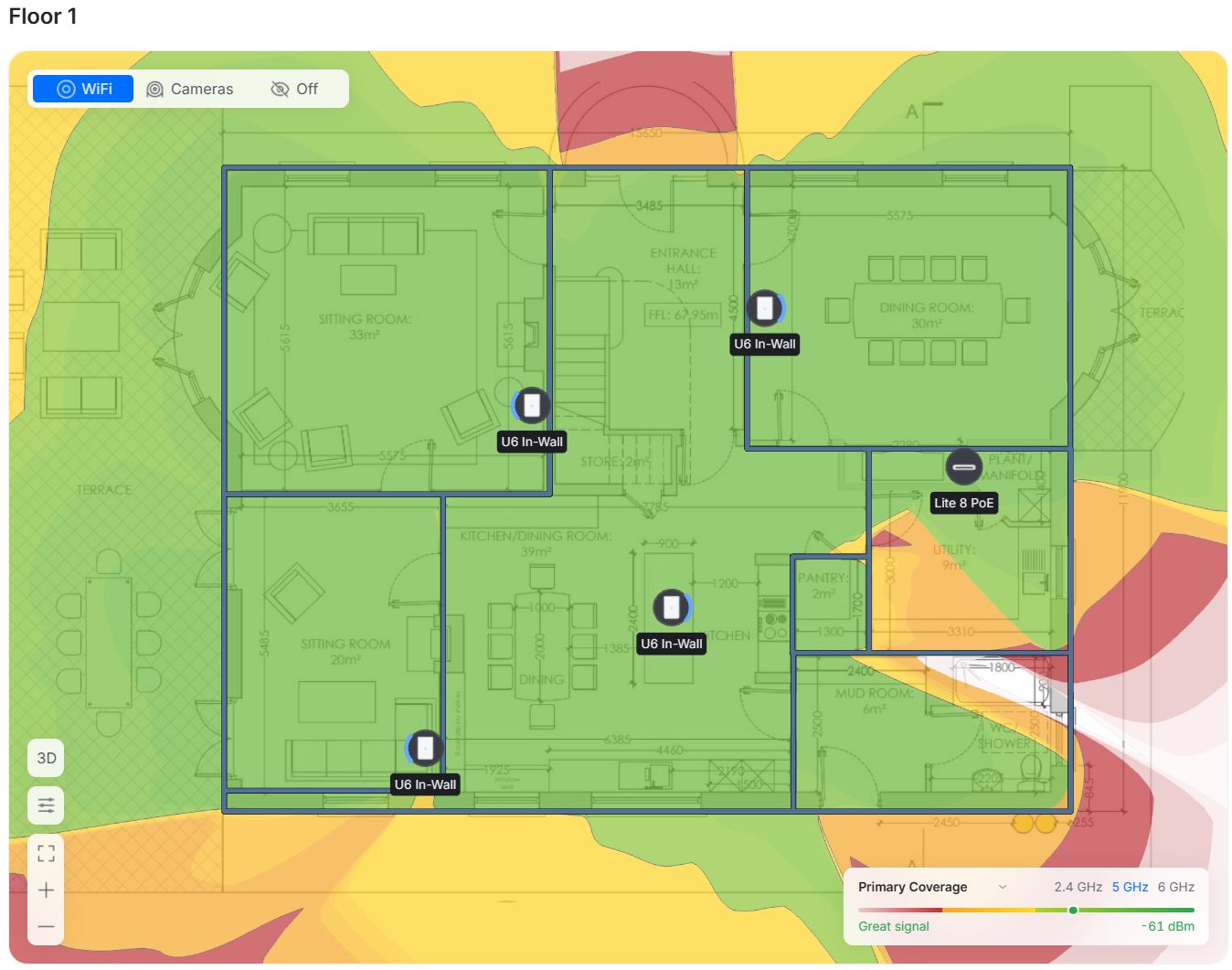
If Wi-Fi is already causing complaints, the expensive mistake is buying more hardware before running a proper Wi-Fi survey to measure what is actually wrong.
If you need help in Dublin or surrounding areas, the closest starting point is Wi-Fi site survey and heatmap, and the next most relevant path is Wi-Fi installation and setup.
What a Wi-Fi survey actually is
A survey is not just “walk around and check bars on a phone.”
A proper survey checks:
- signal strength in the rooms that matter
- interference from nearby networks
- channel overlap
- where users sit and work
- where your current setup falls apart under load
Then that data is turned into a heatmap, which is just a visual map showing where coverage is strong, weak, or unreliable.
So instead of guessing where to place access points, you can place them based on measured data.
And yes, that usually means fewer devices and better results.
Who should get one
This is useful for more people than most expect.
A survey makes sense if:
- you are moving into a new office or larger home
- you keep getting complaints in specific rooms
- you run guest Wi-Fi and staff systems on the same site
- you are planning a big refit or expansion
- you already bought hardware but results are still poor
It is also very useful before signing off a large install quote.
If someone says “you need six access points,” fair enough. But a survey shows whether you really need six, or maybe four in better spots.
A real-world example (very common)
Small office, two floors, around 20 staff.
Symptoms:
- upstairs calls cutting out
- printer disconnects
- random slow afternoons
What they assumed:
“The internet package is too slow.”
What survey data showed:
- broadband line was fine
- two access points were fighting on the same channels
- one access point was mounted in the worst possible place, tucked near metal shelving
- signal looked okay in corridors but poor where people actually sat
Fix:
- move one access point
- change channel plan
- add one correctly placed AP
Result:
Stable calls, no afternoon collapse, no expensive rip-and-replace.
That is why survey-first planning pays for itself.
What you should get in a survey report
If you pay for a formal survey, ask for a report you can actually use later.
At minimum it should include:
- coverage maps by area
- problem areas clearly marked
- a plain-language summary of what is wrong
- a recommended fix plan in priority order
- practical placement guidance for APs
You should not get a 40-page PDF that says a lot but tells you nothing.
You want clear actions.
Good report = “Do this first, then this, then this.”
Bad report = “Wi-Fi appears sub-optimal” and no real plan.
Home vs business surveys
The process is similar, but the focus changes.
For homes, you care about:
- bedrooms
- office room
- TV zones
- garden office or shed
For businesses, you care about:
- staff work areas
- payment/till areas
- meeting rooms
- guest areas
- busy-hour stability
So yes, homes can absolutely benefit.
If your speed is great near the router but rough in the rooms you use, this is worth doing.
If that sounds familiar, read this first: How to Check if Your Internet Is Slow or Your Wi-Fi Is Weak.
Common mistakes people make before calling for a survey
- buying random extenders and hoping for magic
- testing with one old phone and assuming the whole network is bad
- moving the router three times instead of fixing layout
- mixing old and new gear with no plan
- assuming every issue is the ISP
None of that is unusual. We see it every week.
But each wrong purchase makes the final fix harder.
How to choose a good survey provider
You want someone who does three things:
- explains findings in plain language
- gives a practical step-by-step fix plan
- is willing to work with some existing hardware when it makes sense
And avoid anyone who starts with “you need all new everything” before measuring anything.
Could full replacement be needed sometimes? Yes.
But if they decide that before data collection, walk away.
Will a survey fix Wi-Fi on its own?
No. The survey is the diagnosis.
The fix comes from acting on it.
That might mean:
- better placement
- improved settings
- extra APs in key spots
- cleaner cabling where needed
If you also need implementation, Wi-Fi installation and setup and Wi-Fi dead zone fixes are usually the next step after the report.
Is it worth the money?
In most problem sites, yes.
Because the alternative is usually:
- wasted hardware spend
- recurring outages
- staff time lost
- frustrated home users or customers
A survey does not just make technical sense. It saves time and bad decisions.
And that is usually where the real cost is.
Quick checklist before booking
- list the exact rooms/areas that matter most
- note times when problems are worst
- note device types (laptop, phones, POS, TVs, printers)
- keep one week of issue examples
- know your current broadband package speed
That gives you a better starting point and a better report.
When to stop guessing
If this issue affects work, payments, move-in deadlines, customer experience, or the rooms people rely on every day, it is usually cheaper to diagnose it properly than to keep layering on random fixes.
Bottom line
A practical guide to Wi-Fi surveys and heatmaps for homes and businesses in Ireland, what the report includes, and when it is worth paying for one.
If you want help with this in Dublin or surrounding areas, start with Wi-Fi site survey and heatmap, Wi-Fi installation and setup, or book a consultation.
- wifi
- heatmap
- site-survey
- troubleshooting
- ireland