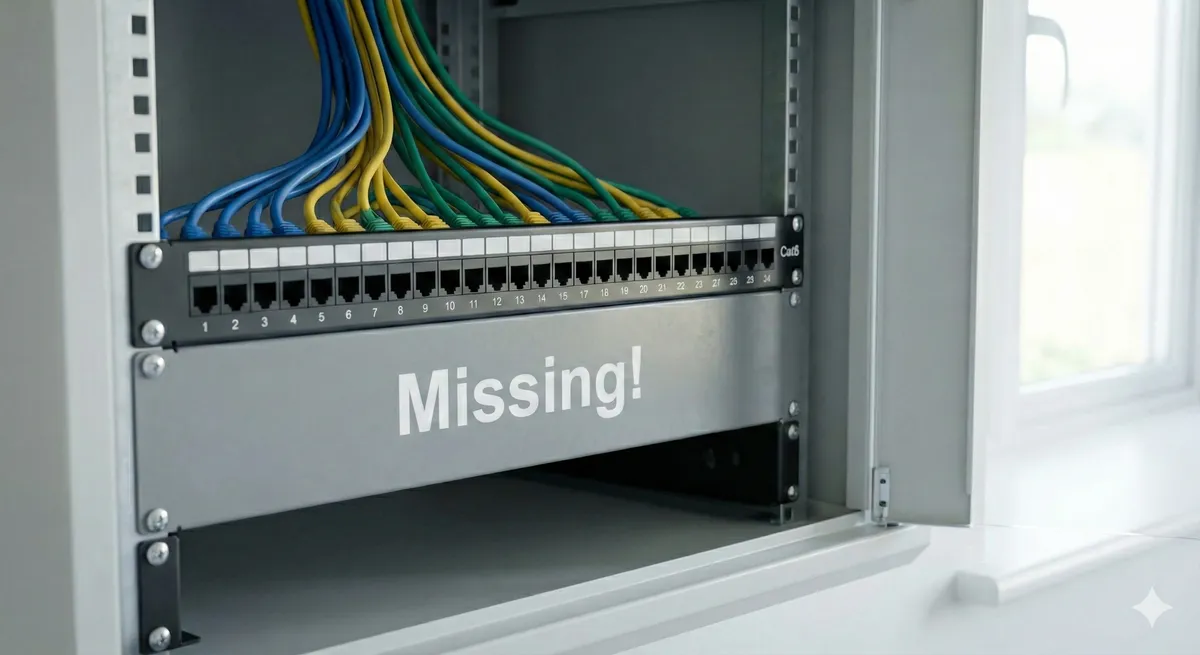
If your new build has Ethernet sockets that do nothing, the missing piece is usually simpler than people expect: a network switch connecting the patch panel properly.
If you need help in Dublin or surrounding areas, the closest starting point is structured cabling, and the next most relevant path is Wi-Fi installation and setup.
What the builder actually installed
Here is what most new builds come with:
- Ethernet sockets on the walls in key rooms.
- Cat5e or Cat6 cables running from each socket back to a central point.
- A patch panel where all those cables terminate.
That is a solid foundation. Seriously. Having cables in the walls is the hard part, and your builder already did it.
If you are still deciding whether those runs should be Cat6 or Cat6a, read Cat6 vs Cat6a in Ireland.
The patch panel is an organised landing point for cables. It does not send data anywhere by itself.
Think of it like plumbing pipes that all lead to the boiler room, but nobody connected them to the boiler.
What’s missing: a network switch
A network switch is the box that actually connects everything together.
It plugs into your router (or modem) and then connects to each port on the patch panel using short patch cables. Once that is done, every socket in the house becomes a live network port.
That is it. That is the fix.
No new cables. No drilling. No electrician. Just a switch, some patch cables, and five minutes of plugging things in.
Why doesn’t anyone mention this?
Because builders, electricians, and even broadband installers all think someone else will handle it.
The builder installs the cables and patch panel. Job done from their side.
The broadband installer sets up the router. Job done from their side.
Nobody connects the two. And nobody explains what you need to finish the job.
So you end up with a house full of ethernet sockets that do absolutely nothing. And you assume something is wrong.
How to fix it yourself
If you are happy doing a bit of plugging in, here is what you need:
1. Get a network switch
An unmanaged gigabit switch is what most homes need. They are simple. Plug in, it works. No setup, no configuration, no software.
Pick one with enough ports for the number of sockets you have, plus a couple of spares. If you have six wall sockets, an 8-port switch gives you room.
2. Get patch cables
You need short ethernet patch cables (Cat5e or Cat6, either works) to connect the switch to each port on the patch panel. And one more cable to connect the switch to your router.
Usually 0.5m or 1m cables are enough if the switch sits beside the patch panel.
3. Plug it all in
- Connect the switch to your router with one patch cable.
- Connect each port on the switch to a port on the patch panel.
- Power on the switch.
- Go to any wall socket and plug in a device.
It should just work.
If you want this done properly and cleanly as part of a wider network project, we offer structured cabling (Cat6/Cat6a/Fibre) as a standalone service.
Which switch should I get?
For most homes, an unmanaged gigabit switch does the job. No configuration needed. Plug in and go.
But here are a few things worth thinking about:
Number of ports. Count your wall sockets and add two or three spares. An 8-port or 16-port switch covers most homes.
Gigabit, not Fast Ethernet. Make sure it says “Gigabit” or “10/100/1000.” Avoid anything that only does 10/100. That is old and slow.
Metal vs plastic case. Does not matter much in a home, but metal cases handle heat better if the switch lives in a closed cabinet.
Managed vs unmanaged. Unmanaged is fine for most homes. Managed switches give you more control (like VLANs and traffic priority), but you need to know what you are doing or have someone set it up for you.
What about PoE?
If you are planning to add Wi-Fi access points, security cameras, or other devices that can be powered over ethernet, a PoE (Power over Ethernet) switch is worth considering.
A PoE switch sends power and data through the same cable. So you can mount a ceiling access point without running a separate power cable to it.
This is a bigger investment. But if you are already thinking about proper Wi-Fi installation and setup, it makes sense to plan for it now rather than buying two switches.
What if my patch panel labels don’t match the rooms?
This is more common than you would think.
Builders sometimes label ports with numbers that do not match any room, or do not label them at all.
Here is how to figure out which port goes where:
- Plug a device into a wall socket.
- At the patch panel, connect one port at a time to the switch.
- Check if the device gets a connection.
- Label that port with the room name.
- Repeat for each socket.
Tedious, but you only do it once. After that, everything is labelled and easy.
If you would rather not deal with this, that is the sort of thing we sort out during a Wi-Fi installation and setup visit.
What if some sockets still don’t work after adding the switch?
If a socket does not come alive after you patch it into the switch, there are a few possible reasons:
- Cable not terminated properly. The cable might not be punched down correctly at the patch panel or wall socket. This is a wiring issue, not a switch issue.
- Cable damaged during construction. It happens. Sometimes cables get nicked, bent too tight, or crushed during the build.
- Wrong port patched. The label might be wrong. Try other patch panel ports to see if a different one lights up.
- Socket wired for phone, not data. Some builders wire certain sockets for phone use only, which means fewer pairs connected.
For anything beyond basic plug-and-play, a quick troubleshooting visit can rule out the harder stuff.
Should I put the switch in the comms cabinet?
If your home has a comms cabinet (a small wall-mounted box where the patch panel lives), yes. Keep the switch there.
It keeps everything tidy: patch panel, switch, router, and any future gear all in one place.
If there is no cabinet and everything is just loose on a shelf, that is still fine. But a small cabinet keeps things clean and out of the way. And it makes future upgrades much simpler.
We covered comms cabinets in more detail in New Build Wi-Fi Is Harder Than It Looks.
Don’t stop at just making the sockets work
Getting a switch connected is the first step. But if you want real performance across the house, it is worth thinking about what comes next:
- Wired backhaul for Wi-Fi access points. Instead of mesh systems talking to each other wirelessly, you can wire them in using the ethernet runs you already have. Much more stable.
- Dedicated connections for heavy-use devices. TVs, consoles, desktops, and work PCs all perform better on wired connections than Wi-Fi.
- Future-proof for cameras, smart home, and more. Those spare ethernet sockets are not just for internet. Cameras, smart hubs, and other devices can use them too.
The cabling is already in your walls. The hard part is done. A switch just wakes it all up.
Bottom line
New build homes come with ethernet sockets and a patch panel, but most people don’t realise you still need a network switch to make them work. Here is what’s missing and how to fix it.
If you want help with this in Dublin or surrounding areas, start with structured cabling, Wi-Fi installation and setup, or book a consultation.